

XSS漏洞学习: HTML 从 0 到 1 详解
环境信息
Tips:所有代码使用Microsoft Visual Studio Code编写
环境:Windows10
浏览器:Microsoft Edge
HTML标准:HTML5
CSS标准:CSS3
零、准备工作
1、创建 HTML 文件
打开 Visual Studio Code,新建一个文件,把下面这段代码保存为 .html 后缀:
<!DOCTYPE html>
<html lang="zh-CN">
    <head>
        <meta charset="utf-8">
        <title>我的第一个页面</title>
    </head>
    <body>
        <h1>Hello World!</h1>
    </body>
</html>
按 Ctrl+S 保存时,文件后缀必须写成 .html,例如 first.html。不要保存成 .txt 或 Markdown 文件。
2、在浏览器中打开
进入文件保存目录,直接双击 first.html,浏览器就会解析这段 HTML 并显示页面。
也可以右键 first.html,选择“打开方式”,再选择 Microsoft Edge、Chrome 或 Firefox。
3、修改文件后刷新页面
在 Visual Studio Code 中修改并保存代码,回到浏览器按 F5 刷新,就能看到最新效果。
4、使用开发者工具查看页面
在页面上按 F12,可以打开浏览器开发者工具,查看网页源代码、元素样式、控制台报错和网络请求。后面的 HTML 示例都会在浏览器中运行,建议遇到问题先到这里看控制台提示。
一、基本介绍
HTML(HyperText Markup Language,超文本标记语言)是用于创建网页的标准语言
HTML使用标签来标记和描述网页,浏览器解析后以网页形式显示出来
二、HTML基础语法结构
1、语法
HTML5由标签组成,其有自己的属性和属性值
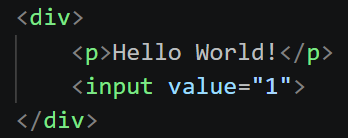
标签分为单标记(无结束标记)和双标记(成对的开始和结束标记)
单标记(自结束标记):
<hr/>
但HTML5推荐省略结尾的”/“,不过”<hr/>“的写法浏览器仍可正常解析:
<hr>
双标记(标准标记):
<title></title>
常见标签及其属性:
| 标签 | 作用 | 属性 | 示例 |
|---|---|---|---|
| <html></html> | 定义HTML文档 | lang(设置网页语言) | <html lang=“zh-CN”>…</html> |
| <head></head> | 定义文档头信息 | 无(仅全局属性),内含 title、meta、link 等子标签 | <head>something</head> |
| <body></body> | 定义文档体 | 无 | <body>something</body> |
| <title></title> | 定义网页标题 | 无 | <title>something</title> |
| <meta> | 定义页面相关信息 | charset(设置字符集编码格式)、name(定义元数据名称,可选”author”作者等等) | <meta charset=“utf-8”><meta name=“author” content=“X1Lyr404”> |
| <link> | 引入外部资源(如CSS样式表、网页图标) | rel(声明被链接文件与当前文件关系)、type(声明被链接文件类型)、href(外部资源地址如样式表、图标等) | <link rel=“icon” type=“image/x-icon” href=“URI”> |
| <a></a> | 定义超链接 | href(链接跳转,“#”空链接)、target(打开方式,_self当前页,_blank新窗口)、rel(rel=“noopener noreferrer”新窗口安全优化)、download(点击下载文件) | <a href=“URI/URL”>…</a> |
| <div></div> | 定义文档一个分隔区块或区域部分 | 无 | <div>something</div> |
| <img> | 定义文章图片 | src(图片资源地址,必填)、alt(图片加载失败的替代文字,必填但可以填空值"")、width/height(宽高)、loading=“lazy”(图片懒加载) | <img src=“URI” alt=“Alternative Text”> |
| <table></table> | 定义表格 | border(设置表格边框,已被CSS border替代) | <table>thead、tbody…</table> |
| <tr></tr> | 定义表格行 | 无 | <tr>something</tr> |
| <td></td> | 定义表格单元格(数据格) | colspan(单元格跨列合并)、rowspan(单元格跨行合并) | <td>something</td> |
| <form></form> | 定义表单 | action(表单提交接口地址)、method(提交方式)、enctype(编码格式,文件上传必须multipart/form-data)、target(提交响应页面打开位置)、autocomplete(on/off浏览器自动填充)、novalidate(关闭浏览器原生表单校验) | <form action=“URI” method=“post”>something</form> |
| <input> | 定义表单输入域 | type(输入框类型)、name(表单提交key,必须)、value(输入框值)、id(DOM唯一标识)、placeholder(输入框提示文字)、checked(布尔属性)、disabled(禁用输入框)、readonly(只读不能改但表单仍提交)、required(浏览器原生校验,必须)、maxlength(最大输入长度)、min/max(数字输入框最小/最大值)、form(关联外部form表单id) | <input type=“text” name=“id” required> |
HTML5也有注释:
<!--HTML注释-->
注意:页面中必须有文档声明且必须在第一行:
<!DOCTYPE html>
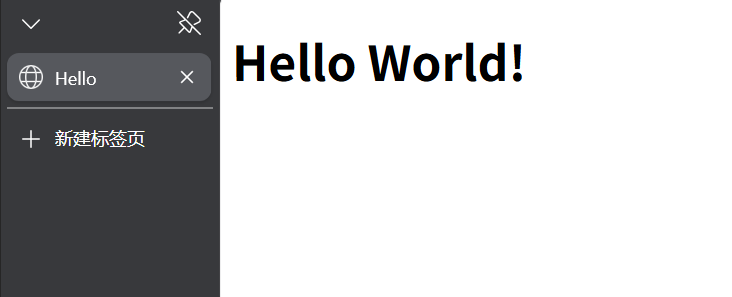
因此,HTML5基本结构:
<!DOCTYPE html>
<html lang="zh-CN">
    <head>
        <meta charset="utf-8">
        <title>Hello</title>
    </head>
    <body>
        <h1>Hello World!</h1>
    </body>
</html>
效果如下:
三、常见块级标签和行级标签
块级标签独占一整行,自动换行
行级标签可以和其他元素同行显示,直到放不下才会换行
块级标签:
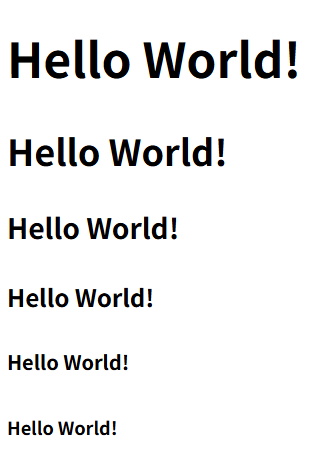
1、<h1~6></h1~6>
作用:设置标题大小
示例:
<!DOCTYPE html>
<html>
    <head></head>
    <body>
        <h1>Hello World!</h1>
        <h2>Hello World!</h2>
        <h3>Hello World!</h3>
        <h4>Hello World!</h4>
        <h5>Hello World!</h5>
        <h6>Hello World!</h6>
    </body>
</html>
效果:
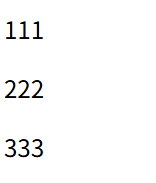
2、<p></p>
作用:区分段落
示例:
<!DOCTYPE html>
<html>
    <head></head>
    <body>
        <p>111</p>
        <p>222</p>
        <p>333</p>
    </body>
</html>
效果:
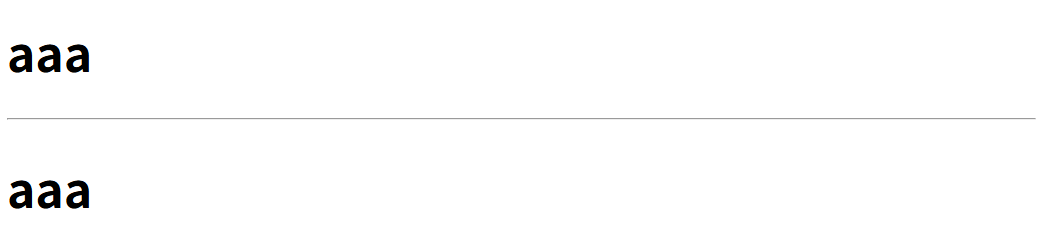
3、<hr>
作用:添加水平线
示例:
<!DOCTYPE html>
<html>
    <head></head>
    <body>
        <h1>aaa</h1>
        <hr>
        <h1>aaa</h1>
    </body>
</html>
效果:
4、<br>
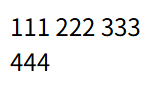
作用:换行
示例:
<!DOCTYPE html>
<html>
    <head></head>
    <body>
        <p>
            111
            222
            333<br>
            444
        </p>
    </body>
</html>
效果:
5、<blockquote></blockquote>、<q></q>、<cite></cite>
作用:
<blockquote></blockquote>:整块左右缩进,语义代表大段引文,cite属性是网址,页面不会显示
<q></q>:行内元素,直接嵌在段落里,浏览器自动生成双引号,行级标签
<cite></cite>:语义标记书名、文章、作品,浏览器默认斜体,行级标签
注意:cite 属性(写在 blockquote/q 上)放链接;<cite>标签包裹文本显示作品名,二者不要搞混
示例:
<!DOCTYPE html>
<html lang="zh-CN">
    <head>
        <meta charset="UTF-8">
    </head>
    <body>
        引用标签示例
        <blockquote cite="https://example.com">
            不以物喜,不以己悲。
            居庙堂之高则忧其民,处江湖之远则忧其君。
        </blockquote>
        <p>范仲淹在<cite>岳阳楼记</cite>中写道:<q>不以物喜,不以己悲</q>,流传千古。</p>
    </body>
</html>
效果:

6、<pre></pre>
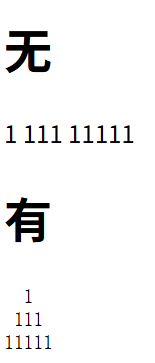
作用:将文字按照原始排列方式呈现
示例:
<!DOCTYPE html>
<html>
    <head></head>
    <body>
        <h1>无</h1>
  1
 111
11111
        <h1>有</h1>
        <pre>
  1
 111
11111
        </pre>
    </body>
</html>
效果:
7、<ul><li></li></ul>、<ol><li></li></ol>
作用:两者都为列表标签,将<li></li>中的项排列
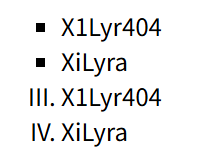
<ul><li></li></ul>为无序列表标签(或称为符号列表标签)
<ul>的 type 用于设置列表符号(如 disc、circle、square),<ol>的 type 用于设置编号样式(如 1、a、A、i、I),两者在 HTML5 中已废弃,推荐用 CSS list-style-type 替代
<ol><li></li></ol>为有序列表标签,以特定顺序排序
同时可以使用CSS padding-left来清除<ol></ol>的缩进
| <ol>标签属性 | 属性值 | 作用 |
|---|---|---|
| type | a、A、1、I、i | 设置编号样式。默认为”1”,大写”I”为Ⅰ、Ⅱ、Ⅲ、Ⅳ…,小写”i”为ⅰ、ⅱ、ⅲ、ⅳ… |
| start | 1、2、…等整数 | 设置编号起始值 |
| reversed | 无 | 反向排序 |
示例:
<!DOCTYPE html>
<html>
    <head>
        <style>
ol{
    padding-left: 0;
    margin: 0;
}
        </style>
    </head>
    <body>
        <ul style="list-style-type: square;">
            <li>X1Lyr404</li>
            <li>XiLyra</li>
        </ul>
        <ol type="I" start="3">
            <li>X1Lyr404</li>
            <li>XiLyra</li>
        </ol>
    </body>
</html>
效果:
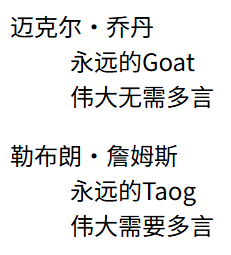
8、<dl></dl>、<dt></dt>、<dd></dd>
作用:定义列表标签,用于复杂定义
<dl></dl>标签定义列表,<dt></dt>定义列表标题,<dd></dd>定义描述项
示例:
<!DOCTYPE html>
<html lang="zh-CN">
    <head>
        <meta charset="utf-8">
    </head>
    <body>
        <dl>
            <dt>迈克尔·乔丹</dt>
            <dd>永远的Goat</dd>
            <dd>伟大无需多言</dd>
        </dl>
        <dl>
            <dt>勒布朗·詹姆斯</dt>
            <dd>永远的Taog</dd>
            <dd>伟大需要多言</dd>
        </dl>
    </body>
</html>
效果:
9、<div></div>
作用:划分页面大块区域,做布局,没有额外视觉样式,最常用的块级元素,通常与 CSS 配合设置样式属性
示例:
<!DOCTYPE html>
<html lang="zh-CN">
    <head>
        <meta charset="UTF-8">
        <style>
.wrap{
  background:#eee;
  padding: 0;
}
.item{
  background:#87ceeb;
  margin: 0;
}
        </style>
    </head>
    <body>
        <div class="wrap">
        <div class="item">盒子A</div>
        <div class="item">盒子B</div>
            <p>段落 <span style="color:red;">红色文字</span></p>
        </div>
    </body>
</html>
代码中设置了两个类(class)wrap和item,分别赋予不同的值:background设置背景颜色,margin设置外边距,同时通过<span>标签配合CSS定义红色文字,效果如下:

行级标签
因为前文已经介绍过<img>图片标签、<a>超链接标签、<cite></cite>斜体标签和<q></q>短引用标签了,这里不再赘述
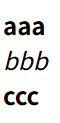
1、<b></b>、<em></em>、<strong></strong>
作用:强调内容,三者程度不同,如下:
| 标签 | 语义 |
|---|---|
| <b></b> | 只粗体展示,无强调语义 |
| <em></em> | 语气重读、句子上的强调(朗读语调变化),斜体展示 |
| <strong></strong> | 内容重要、紧急(语义权重高),粗体展示 |
示例:
<!DOCTYPE html>
<html lang="zh-CN">
    <head>
        <meta charset="UTF-8">
    </head>
    <body>
        <b>aaa</b><br>
        <em>bbb</em><br>
        <strong>ccc</strong>
    </body>
</html>
效果:
2、<small></small>
作用:表示附属、次要、注释、版权、免责声明等次要文本
示例:
<!DOCTYPE html>
<html lang="zh-CN">
    <head>
        <meta charset="UTF-8">
    </head>
    <body>
        <p>产品售价:99元 <small>最终解释权归本店所有</small></p>
    </body>
</html>
效果:

3、<s></s>、<i></i>
作用:<s></s>添加删除线,<i></i>斜体展示
示例:
<!DOCTYPE html>
<html lang="zh-CN">
    <head>
        <meta charset="UTF-8">
    </head>
    <body>
        <p>原价:<s>199元</s> 现价:<i>99元</i></p>
    </body>
</html>
效果:

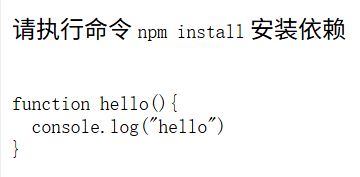
4、<code></code>
作用:标记行内计算机代码、命令等,默认等宽字体。用于单行小段代码,多行使用时搭配<pre>标签
示例:
<!DOCTYPE html>
<html lang="zh-CN">
    <head>
        <meta charset="UTF-8">
    </head>
    <body>
        <p>请执行命令 <code>npm install</code> 安装依赖</p>
        <pre>
            <code>
function hello(){
  console.log("hello")
}
            </code>
        </pre>
    </body>
</html>
效果:
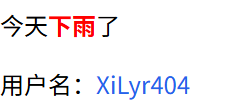
5、<span></span>
作用:包裹文字修改成特定样式,如给局部文字设置CSS样式、添加 class/id 供 CSS 选择器使用,没有默认视觉样式,默认行内显示
示例:
<!DOCTYPE html>
<html lang="zh-CN">
    <head>
        <meta charset="UTF-8">
        <style>
.username {
    color: #2563eb;
}
        </style>
    </head>
    <body>
        <p>今天<span style="color:red; font-weight:bold">下雨</span>了</p>
        <p>用户名:<span class="username">X1Lyr404</span></p>
    </body>
</html>
效果:
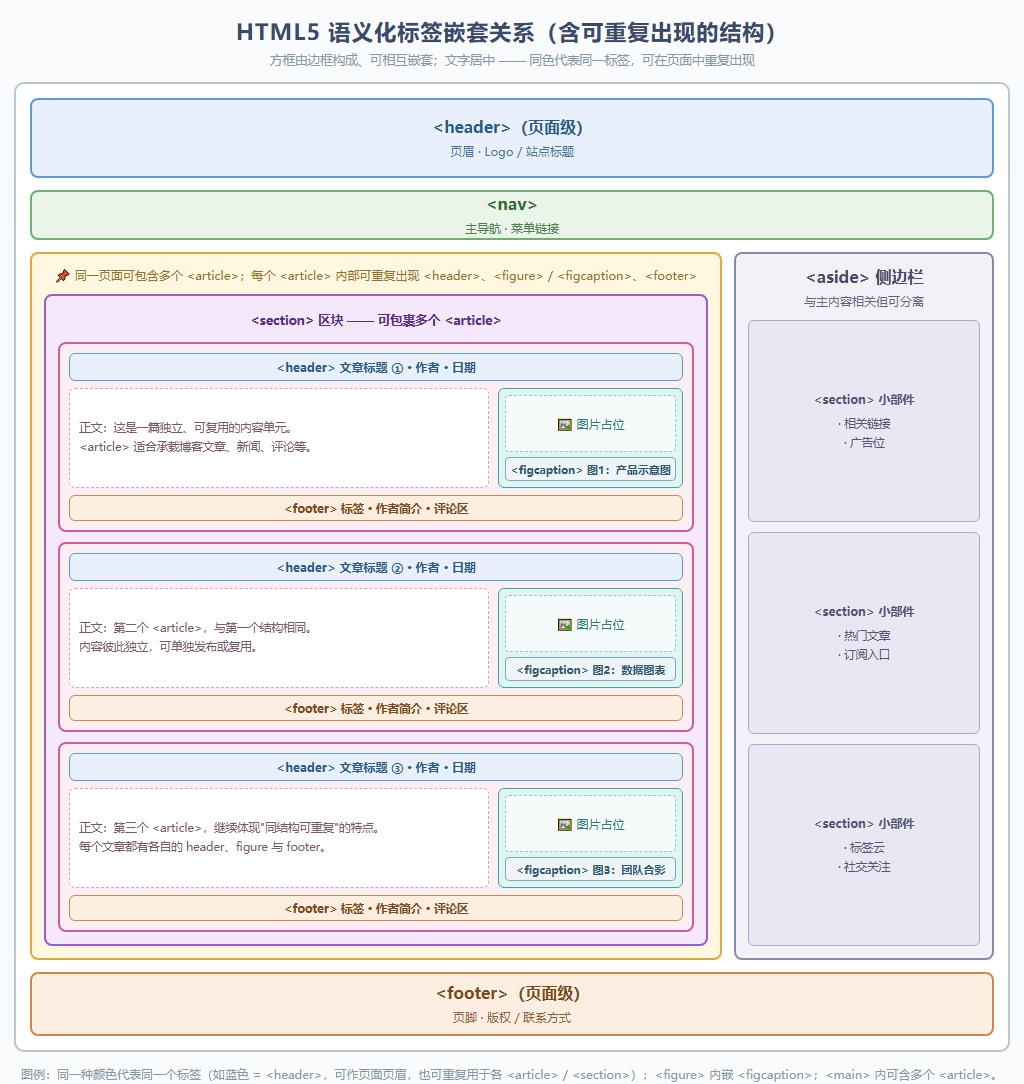
四、HTML5语义化布局标签
| 标签 | 语义 | 使用场景 | 数量 |
|---|---|---|---|
| <header></header> | 头部 | 页面 / 区块头部,logo 标题导航 | 多个 |
| <nav></nav> | 导航 | 主要导航链接块 | 多个 |
| <main></main> | 页面主体 | 页面核心独一无二内容 | 仅 1 个 |
| <section></section> | 章节区块 | 主题性内容分块 | 多个 |
| <article></article> | 独立内容 | 文章、帖子、评论卡片 | 多个,可嵌套 |
| <aside></aside> | 附属侧栏 | 侧边栏、广告、补充信息 | 多个 |
| <footer></footer> | 页脚 | 页面 / 区块底部版权信息 | 多个 |
| <figure></figure> | 图文容器 | 图片图表,搭配 figcaption | 多个 |
| <div></div> | 无语义容器 | 纯粹用来做样式布局盒子 | 任意 |
如下:
五、表格
表格标签:定义表格的<table></table>、定义行的<tr></tr>、定义单元格的<td></td>
| 标签 | 作用 | 专属属性(被CSS替代的属性不列出) | 示例 |
|---|---|---|---|
| <table></table> | 表格 | 无(border,是否显示边框,仅”1”或"",已被CSS代替) | <table>…</table> |
| <caption></caption> | 表格标题 | 无(仅全局属性) | <caption>我的课程表</caption> |
| <colgroup></colgroup> | 列组 | span(该列组覆盖几列) | <colgroup span=“3”>…</colgroup> |
| <col> | 定义列(单标记) | span(该<col>代表几列) | <col span=“2”> |
| <thead></thead> | 表头区 | 无(仅全局属性) | <thead>…</thead> |
| <tbody></tbody> | 主体区 | 无(仅全局属性) | <tbody>…</tbody> |
| <tfoot></tfoot> | 表尾区 | 无(仅全局属性) | <tfoot>…</tfoot> |
| <tr></tr> | 行 | 无(仅全局属性) | <tr>…</tr> |
| <th></th> | 表头单元格 | colspan(横跨几列,默认1)、rowspan(竖跨几行,默认1)、scope(仅<th>声明是列表头还是行表头)、headers(仅<th>和<td>,用id指出这个单元格关联哪些表头单元格)、abbr(给表头提供一个更短的别名,给屏幕阅读器用) | <th scope=“col”>星期一</th> |
| <td></td> | 数据单元格 | colspan(同上)、rowspan(同上)、headers(同上) | <td colspan=“2”>…</td> |
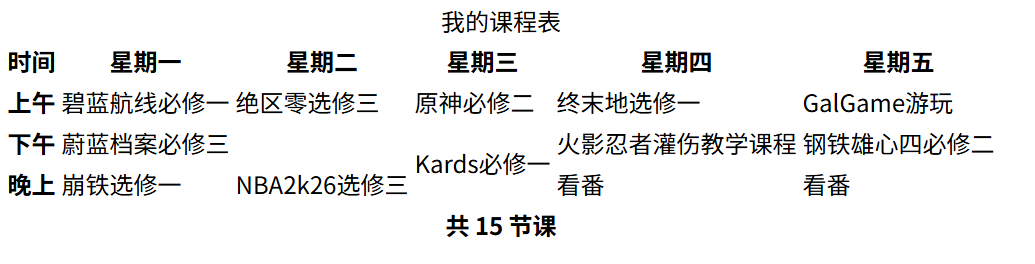
示例(基础版,无CSS):
<!DOCTYPE html>
<html lang="zh-CN">
    <head>
        <meta charset="UTF-8">
        <title>表格标签完整示例</title>
    </head>
    <body>
        <table>
            <caption>我的课程表</caption>
            <colgroup>
                <col>
                <col>
                <col>
                <col>
                <col>
                <col>
            </colgroup>
            <thead>
                <tr>
                    <th scope="col">时间</th>
                    <th scope="col">星期一</th>
                    <th scope="col">星期二</th>
                    <th scope="col">星期三</th>
                    <th scope="col">星期四</th>
                    <th scope="col">星期五</th>
                </tr>
            </thead>
            <tbody>
                <tr>
                    <th scope="row">上午</th>
                    <td>碧蓝航线必修一</td>
                    <td>绝区零选修三</td>
                    <td>原神必修二</td>
                    <td>终末地选修一</td>
                    <td>GalGame游玩</td>
                </tr>
                <tr>
                    <th scope="row">下午</th>
                    <td colspan="2">蔚蓝档案必修三</td>
                    <td rowspan="2">Kards必修一</td>
                    <td>火影忍者灌伤教学课程</td>
                    <td>钢铁雄心四必修二</td>
                </tr>
                <tr>
                    <th scope="row">晚上</th>
                    <td>崩铁选修一</td>
                    <td>NBA2k26选修三</td>
                    <td>看番</td>
                    <td>看番</td>
                </tr>
            </tbody>
            <tfoot>
                <tr>
                    <th scope="row" colspan="6">共 15 节课</th>
                </tr>
            </tfoot>
        </table>
    </body>
</html>
效果:
示例(基础版,有CSS):
<!DOCTYPE html>
<html lang="zh-CN">
    <head>
        <meta charset="UTF-8">
        <title>表格标签完整示例</title>
        <style>
table {
    width: 100%;
    border-collapse: collapse;
}
caption {
    font-size: 20px;
    font-weight: bold;
    padding: 10px;
}
th, td {
    border: 1px solid #ccc;
    padding: 8px;
    text-align: center;
}
th {
    background: #e6f0ff;
}
        </style>
    </head>
    <body>
        <table>

            <caption>我的课程表</caption>
            <colgroup>
                <col style="width: 15%; background: #f5f5f5;">
                <col style="width: 17%;">
                <col style="width: 17%;">
                <col style="width: 17%;">
                <col style="width: 17%;">
                <col style="width: 17%;">
            </colgroup>
            <thead>
                <tr>
                    <th scope="col">时间</th>
                    <th scope="col">星期一</th>
                    <th scope="col">星期二</th>
                    <th scope="col">星期三</th>
                    <th scope="col">星期四</th>
                    <th scope="col">星期五</th>
                </tr>
            </thead>
            <tbody>
                <tr>
                    <th scope="row">上午</th>
                    <td>碧蓝航线必修一</td>
                    <td>绝区零选修三</td>
                    <td>原神必修二</td>
                    <td>终末地选修一</td>
                    <td>GalGame游玩</td>
                </tr>
                <tr>
                    <th scope="row">下午</th>
                    <td colspan="2">蔚蓝档案必修三</td>
                    <td rowspan="2">Kards必修一</td>
                    <td>火影忍者灌伤教学课程</td>
                    <td>钢铁雄心四必修二</td>
                </tr>
                <tr>
                    <th scope="row">晚上</th>
                    <td>崩铁选修一</td>
                    <td>NBA2k26选修三</td>
                    <td>看番</td>
                    <td>看番</td>
                </tr>
            </tbody>
            <tfoot>
                <tr>
                    <th scope="row" colspan="6">共 15 节课</th>
                </tr>
            </tfoot>
        </table>
    </body>
</html>
效果:

六、表单
表单的作用是向服务器提交信息进行处理,如注册、登录等
常用标签有<form></form>、<input>、<textarea></textarea>、<select></select>、<button></button>、<fieldset></fieldset>、<legend></legend>、<label></label>、<output></output>
| 标签 | 作用 | 常用属性 | 说明 / 示例 |
|---|---|---|---|
| <form></form> | 定义表单容器 | action | 提交数据的地址,如 action=“/register” |
| method | 提交方式:get / post | ||
| enctype | 编码类型,上传文件用 multipart/form-data | ||
| target | 提交结果在哪个窗口打开:“_blank”用新标签页打开,“_self”当前页面打开 | ||
| novalidate | 布尔属性,关闭浏览器内置校验 | ||
| <fieldset></fieldset> | 控件分组 | disabled | 禁用组内所有控件 |
| name | 分组名称 | ||
| <legend></legend> | 分组标题 | 无特有属性 | 紧跟<fieldset></fieldset>使用 |
| <label></label> | 控件说明文字 | for | 关联控件 id,如 for=“username” |
| <input> | 通用输入框 | type | 类型:text、password、email、number、date、file、checkbox、radio、hidden、submit 等 |
| name | 字段名,提交时作为键,如 name=“username” | ||
| value | 默认值,checkbox/radio 必须给值 | ||
| placeholder | 占位提示文字,如 placeholder=“请输入用户名” | ||
| required | 必填 | ||
| readonly | 只读,仍会提交 | ||
| disabled | 禁用,不参与提交 | ||
| maxlength / minlength | 最大 / 最小字符长度 | ||
| min / max / step | 数字或日期范围、步长 | ||
| checked | checkbox / radio 默认选中 | ||
| accept | 文件类型过滤,如 accept=“image/*” | ||
| autocomplete | 自动填充:on / off / name 等 | ||
| pattern | 正则校验,如 pattern=“[0-9]{6}” | ||
| multiple | 多选 / 多文件 | ||
| <textarea></textarea> | 多行文本 | name | 字段名 |
| rows / cols | 行数和列数 | ||
| placeholder | 占位提示 | ||
| maxlength | 最大字符数 | ||
| required | 必填 | ||
| readonly / disabled | 只读 / 禁用 | ||
| <select></select> | 下拉列表 | name | 字段名 |
| multiple | 可多选 | ||
| size | 可见选项数 | ||
| required | 必选 | ||
| disabled | 禁用 | ||
| <option></option> | 下拉选项 | value | 提交值,如 value=“sh” |
| selected | 默认选中 | ||
| disabled | 禁用该项 | ||
| <optgroup></optgroup> | 选项分组 | label | 分组标题,如 label=“X1Lyr404” |
| <datalist></datalist> | 输入建议列表 | 无特有属性 | 配合 <input list=”…”> 使用 |
| <button></button> | 按钮 | type | submit 提交 / reset 重置 / button 普通按钮 |
| name / value | 提交时携带的名称和值 | ||
| disabled | 禁用 | ||
| form | 指定关联的表单 id | ||
| <output></output> | 显示计算结果 | for | 关联参与计算的控件 id |
| name | 字段名 | ||
| <progress></progress> | 进度条 | max | 最大值 |
| value | 当前进度值 | ||
| <meter></meter> | 度量值 | min / max | 范围 |
| low / high / optimum | 阈值和最佳值 |
这里有个简单示例:
<!DOCTYPE html>
<html lang="zh-CN">
    <head>
        <meta charset="UTF-8">
        <title>简单表单示例</title>
    </head>
    <body>
        <form action="/login" method="post">
            <label for="username">用户名:</label>
            <input type="text" id="username" name="username" required>
            <label for="password">密码:</label>
            <input type="password" id="password" name="password" required>
            <label for="role">角色:</label>
            <select id="role" name="role">
                <option value="student">学生</option>
                <option value="teacher">老师</option>
            </select>
            <label for="remark">备注:</label>
            <textarea id="remark" name="remark" rows="3"></textarea>
            <button type="submit">登录</button>
            <button type="reset">重置</button>
        </form>
    </body>
</html>
效果:

你毕业了!!!
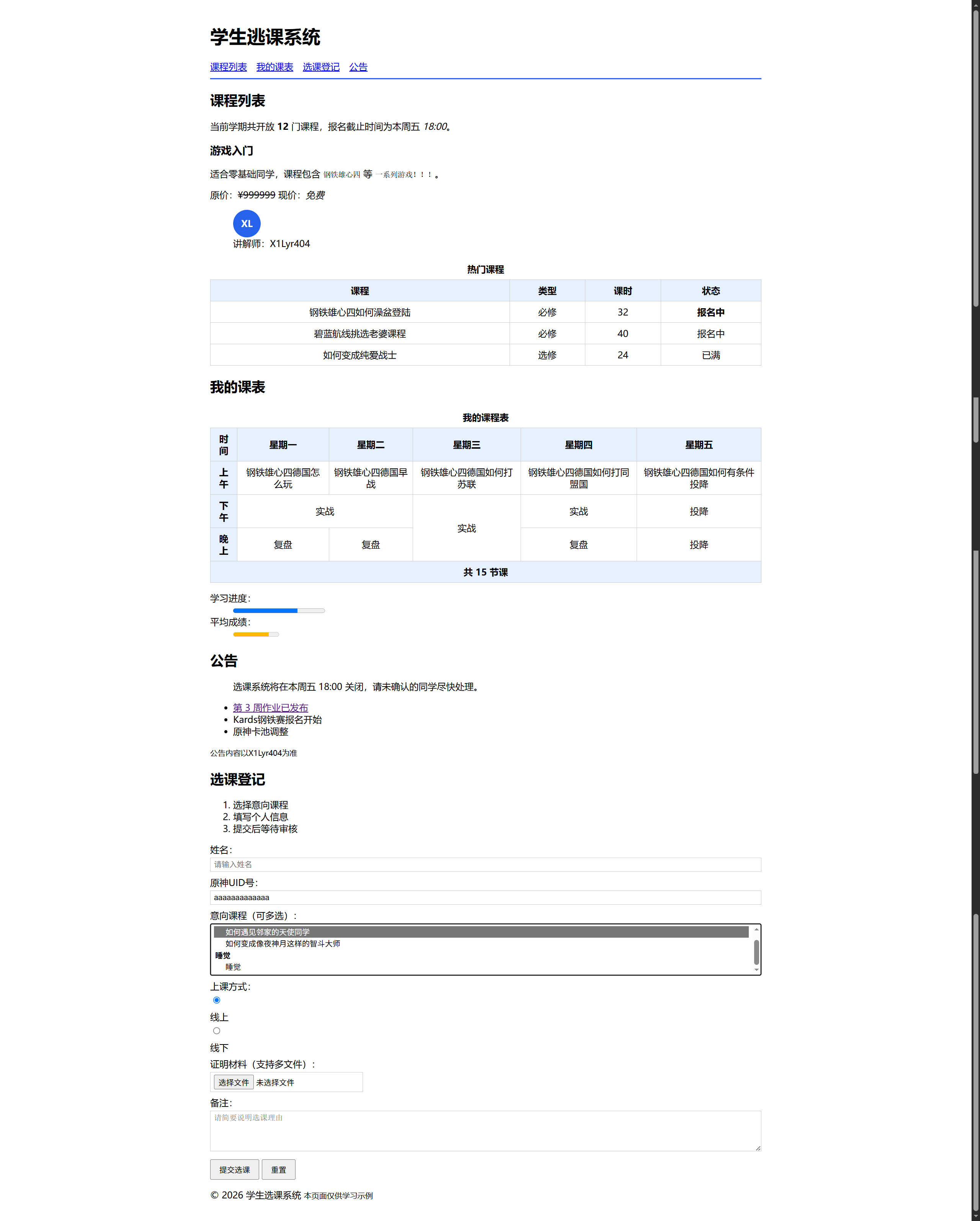
恭喜你学完了HTML入门,那你来试试独自写出这个复杂了一点点的示例吧!😋:
界面:
代码:
<!DOCTYPE html>
<html lang="zh-CN">
    <head>
        <meta charset="UTF-8">
        <title>学生选课系统</title>
        <style>
body {
    max-width: 960px;
    margin: 0 auto;
    padding: 20px;
    font-family: "Microsoft YaHei", Arial, sans-serif;
}
header {
    border-bottom: 2px solid #2563eb;
    padding-bottom: 10px;
}
nav a {
    margin-right: 12px;
}
table {
    width: 100%;
    border-collapse: collapse;
}
caption {
    font-weight: bold;
    padding: 8px;
}
th, td {
    border: 1px solid #ccc;
    padding: 8px;
    text-align: center;
}
th {
    background: #e6f0ff;
}
label {
    display: block;
    margin: 8px 0 4px;
}
input,
select,
textarea {
    box-sizing: border-box;
    width: 100%;
    padding: 4px 6px;
    border: 1px solid #ccc;
}
input[type="radio"],
input[type="checkbox"],
input[type="file"] {
    width: auto;
}
button {
    margin-top: 10px;
    padding: 6px 14px;
}
.avatar {
    width: 48px;
    height: 48px;
    line-height: 48px;
    text-align: center;
    background: #2563eb;
    color: #fff;
    font-weight: bold;
    border-radius: 50%;
}
        </style>
    </head>
    <body>
        <header>
            <h1>学生逃课系统</h1>
            <nav>
                <a href="#courses">课程列表</a>
                <a href="#schedule">我的课表</a>
                <a href="#enroll">选课登记</a>
                <a href="#notice">公告</a>
            </nav>
        </header>
        <main>
            <section id="courses">
                <h2>课程列表</h2>
                <p>当前学期共开放 <strong>12</strong> 门课程,报名截止时间为本周五 <em>18:00</em>。</p>
                <article>
                    <h3>游戏入门</h3>
                    <p>适合零基础同学,课程包含 <code>钢铁雄心四</code> 等 <code>一系列游戏!!!</code>。</p>
                    <p>原价:<s>¥999999</s> 现价:<i>免费</i></p>
                    <figure>
                        <div class="avatar">XL</div>
                        <figcaption>讲解师:X1Lyr404</figcaption>
                    </figure>
                </article>
                <table>
                    <caption>热门课程</caption>
                    <thead>
                        <tr>
                            <th>课程</th>
                            <th>类型</th>
                            <th>课时</th>
                            <th>状态</th>
                        </tr>
                    </thead>
                    <tbody>
                        <tr>
                            <td>钢铁雄心四如何澡盆登陆</td>
                            <td>必修</td>
                            <td>32</td>
                            <td><b>报名中</b></td>
                        </tr>
                        <tr>
                            <td>碧蓝航线挑选老婆课程</td>
                            <td>必修</td>
                            <td>40</td>
                            <td>报名中</td>
                        </tr>
                        <tr>
                            <td>如何变成纯爱战士</td>
                            <td>选修</td>
                            <td>24</td>
                            <td>已满</td>
                        </tr>
                    </tbody>
                </table>
            </section>
            <section id="schedule">
                <h2>我的课表</h2>
                <table>
                    <caption>我的课程表</caption>
                    <colgroup>
                        <col>
                        <col>
                        <col>
                        <col>
                        <col>
                        <col>
                    </colgroup>
                    <thead>
                        <tr>
                            <th scope="col">时间</th>
                            <th scope="col">星期一</th>
                            <th scope="col">星期二</th>
                            <th scope="col">星期三</th>
                            <th scope="col">星期四</th>
                            <th scope="col">星期五</th>
                        </tr>
                    </thead>
                    <tbody>
                        <tr>
                            <th scope="row">上午</th>
                            <td>钢铁雄心四德国怎么玩</td>
                            <td>钢铁雄心四德国早战</td>
                            <td>钢铁雄心四德国如何打苏联</td>
                            <td>钢铁雄心四德国如何打同盟国</td>
                            <td>钢铁雄心四德国如何有条件投降</td>
                        </tr>
                        <tr>
                            <th scope="row">下午</th>
                            <td colspan="2">实战</td>
                            <td rowspan="2">实战</td>
                            <td>实战</td>
                            <td>投降</td>
                        </tr>
                        <tr>
                            <th scope="row">晚上</th>
                            <td>复盘</td>
                            <td>复盘</td>
                            <td>复盘</td>
                            <td>投降</td>
                        </tr>
                    </tbody>
                    <tfoot>
                        <tr>
                            <th scope="row" colspan="6">共 15 节课</th>
                        </tr>
                    </tfoot>
                </table>
                <dl>
                    <dt>学习进度:</dt>
                    <dd><progress max="100" value="70">70%</progress></dd>
                    <dt>平均成绩:</dt>
                    <dd><meter min="0" max="100" low="60" high="85" optimum="90" value="78">78</meter></dd>
                </dl>
            </section>
            <aside id="notice">
                <h2>公告</h2>
                <blockquote cite="https://example.com/notice">
                    选课系统将在本周五 18:00 关闭,请未确认的同学尽快处理。
                </blockquote>
                <ul>
                    <li><a href="#">第 3 周作业已发布</a></li>
                    <li>Kards钢铁赛报名开始</li>
                    <li>原神卡池调整</li>
                </ul>
                <p><small>公告内容以X1Lyr404为准</small></p>
            </aside>
            <section id="enroll">
                <h2>选课登记</h2>
                <ol>
                    <li>选择意向课程</li>
                    <li>填写个人信息</li>
                    <li>提交后等待审核</li>
                </ol>
                <form action="/enroll" method="post" enctype="multipart/form-data" novalidate>
                    <label for="name">姓名:</label>
                    <input type="text" id="name" name="name" placeholder="请输入姓名" required maxlength="20">
                    <label for="student-id">原神UID号:</label>
                    <input type="text" id="student-id" name="studentId" pattern="[0-9]{9}" placeholder="9 位数字" required>
                    <label for="courses">意向课程(可多选):</label>
                    <select id="courses" name="courses" multiple size="4">
                        <optgroup label="追番">
                            <option value="html" selected>如何遇见邻家的天使同学</option>
                            <option value="js">如何变成像夜神月这样的智斗大师</option>
                        </optgroup>
                        <optgroup label="睡觉">
                            <option value="web-security">睡觉</option>
                        </optgroup>
                    </select>
                    <label>上课方式:</label>
                    <input type="radio" id="online" name="mode" value="online" checked>
                    <label for="online">线上</label>
                    <input type="radio" id="offline" name="mode" value="offline">
                    <label for="offline">线下</label>
                    <label for="proof">证明材料(支持多文件):</label>
                    <input type="file" id="proof" name="proof" accept="image/*,.pdf" multiple>
                    <label for="remark">备注:</label>
                    <textarea id="remark" name="remark" rows="4" maxlength="200" placeholder="请简要说明选课理由"></textarea>
                    <button type="submit">提交选课</button>
                    <button type="reset">重置</button>
                </form>
            </section>
        </main>
        <footer>
            <p>© 2026 学生选课系统 <small>本页面仅供学习示例</small></p>
        </footer>
    </body>
</html>
你毕业了!可以去送外卖了!!!
参考文献:
《Web前端学习笔记:HTML5+CSS3+JavaScript》
Bilibili博主:康文昌《从零开始的编程之路》
菜鸟教程:https://www.runoob.com/html/html-tutorial.html
- 接下来学习JavaScript基础后就可以学习XSS漏洞了!